Terminal. Desktop. Browser.
One AI. Three surfaces.
One Createnano account unlocks you in three places at once: the creaneo-code CLI writes code in your terminal, Createnano IDE gives you a full native desktop environment, and the Chrome extensionopens as a side panel that reads the page, clicks through it, and reviews your Meta & Google Ads accounts.
Three modes · one assistant
Same account. Different jobs. Real results.
Let it drive the browser.
With Operator mode on, the AI can drive Chrome in real time: open tabs, scroll the page, fill forms, click buttons by CSS selector or by visible text, read the live DOM as structured JSON (read_page), and capture screenshots. Every action requires your approval — nothing happens by accident.
- Click by text — no CSS selector required
- read_page returns the page structure as JSON
- fill_and_submit sends the form in one step
- Auto-continue: extract results feed back and chain
{
  "type": "google_search",
  "query": "cheap flights Istanbul to Saint Petersburg"
}{
"type": "navigate",
"url": "https://adsmanager.facebook.com/adsmanager/manage/campaigns"
}read_page → parse the metrics → 4-line diagnosis: wins / waste / change / test.Your media buyer, in a tab.
Ads mode opens Meta Ads Manager and Google Ads, reads the campaign table with real numbers, and diagnoses it like a senior media buyer: CTR / CPM / CPA / ROAS / Frequency / Quality Score / Impression Share. No fabricated data — only the numbers on the screen.
- Reads campaigns, ad sets, and keywords together
- Crisp recommendations for targeting, budget, placement, and bid strategy
- Benchmarks the data: weak / okay / strong
- Never touches payment info, passwords, or cookies — campaign data only
/meta-ads, /google-ads, /ads-audit — one line, the AI opens the right dashboard and hands you the report.Chat the page. Summarize. Explain.
Seven personas (Coder, Writer, Translator, Tutor, Research, Casual, Operator, Ads), slash command palette, voice input, text-to-speech, screenshot attachments, page context, search, and markdown export — all in the side panel.
7 persona
Slash commands
Voice + TTS
Page context
Export MD
OTP login
Install
Start wherever you want.
One Createnano account unlocks all three. Sign in once and the others link automatically.
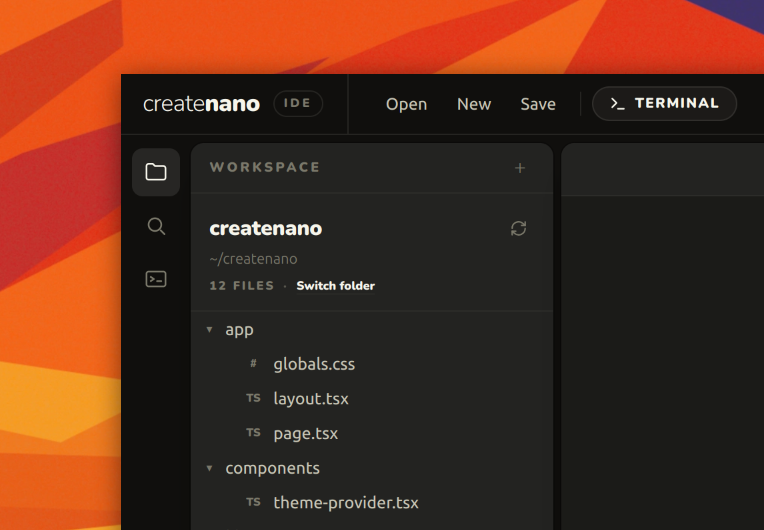
Native desktop IDE
Createnano IDE
A real desktop app — file explorer, tabbed editor, terminal, and the Creaneo AI side panel all in one window. Your code never leaves your machine.
Native desktop app
Real workspace
Creaneo AI panel
Install (one line)
$curl -fsSL https://createnano.com/install-ide.sh | shLaunch the IDE
$createnano-ideInstalls to ~/.local/share/createnano-ide. macOS · Linux · Windows (WSL). Requires Node.js 18+.
Shares its session with creaneo-code — one login unlocks both tools.
Take back your ad budget and your time.
Hand the daily “check the dashboard, write the report” loop over to the AI. It talks like a senior media buyer — and it's open in your tab 24/7.